> ## Documentation Index
> Fetch the complete documentation index at: https://docs.usesuperflow.com/llms.txt
> Use this file to discover all available pages before exploring further.
# How to enter exit comment mode
## How to Enter/Exit Comment Mode
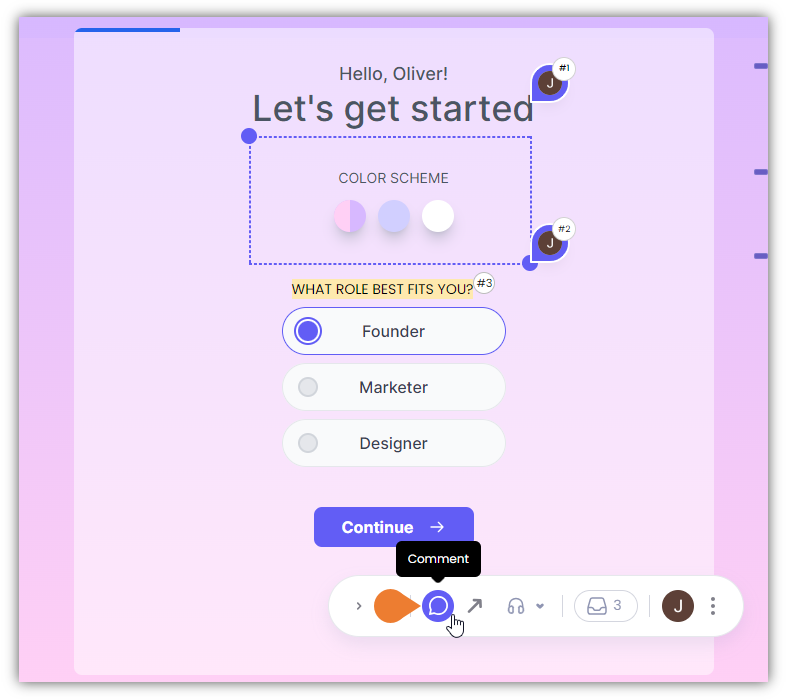
In this article, you will learn how to enter/exit the Comment Mode. This mode enables you to manage comments.
1. Find the **Superflow Toolbar** and click the **Comment** icon to access the comment mode.
 2. You will enter the **Comment Mode** as the browser indicates. When you enter the **Comment Mode**, you will be able to do the following:
* Comment on Elements
* Comment on Text
* Comment on Images
* Draw a Box Comment
2. You will enter the **Comment Mode** as the browser indicates. When you enter the **Comment Mode**, you will be able to do the following:
* Comment on Elements
* Comment on Text
* Comment on Images
* Draw a Box Comment
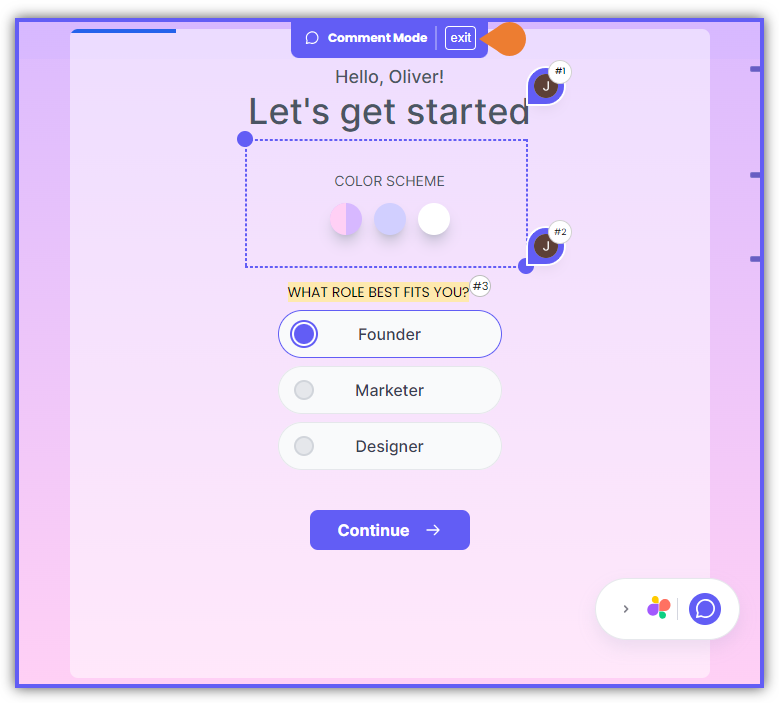 3. To exit the **Comment Mode**, press the **ESC** on your keyboard or click the **esc to exit** indicator on top of the browser.